N Now on the App Store · iOS 26

Your private tunnel,
beautifully simple.

Kyberlink is a fast, lightweight VPN client for iPhone. Bring your own tunnel config, tap once to connect — and browse with confidence.
iPhone · iOS 26.0+ Free No account No tracking
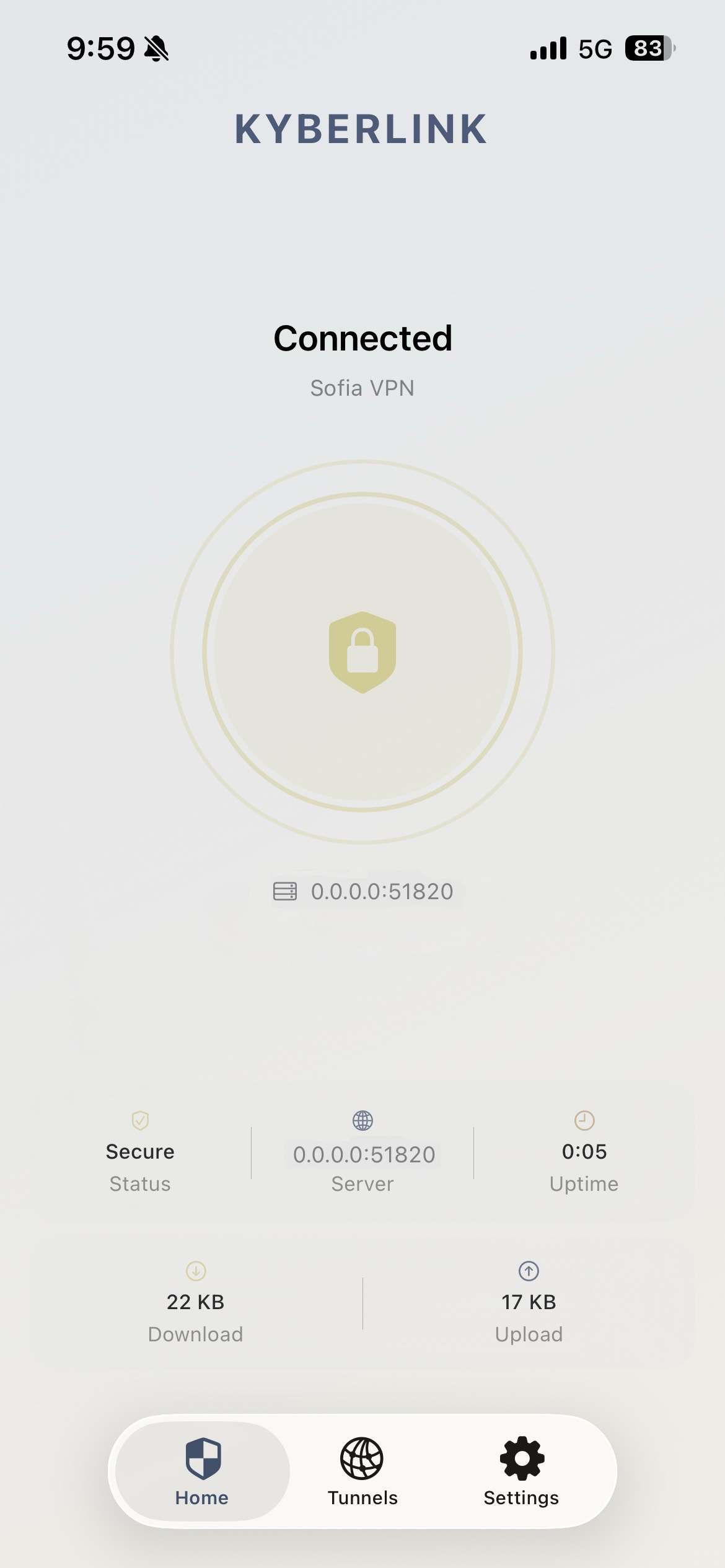
Kyberlink running on iPhone, showing an active tunnel with live connection stats.
Features

Your keys. Your server. Your rules.

Kyberlink is built for people who run their own tunnels — fast, private, and uncompromisingly yours from first handshake to final byte.

Blazing fast

Built on Apple's NetworkExtension framework with a modern, kernel-grade tunnel protocol for minimal overhead and maximum throughput.

End-to-end encrypted

Modern cryptography — ChaCha20, Poly1305, Curve25519 — keeps your traffic private between you and your server.

Import in one tap

Add tunnels from a .conf file, QR code or pasted config. Switch between profiles instantly.

On-demand rules

Auto-connect on untrusted Wi-Fi, stay off on your home network — you decide the rules.

Live stats

See handshakes, transfer rates and session time at a glance, right from the main screen.

Built for iOS 26

Native SwiftUI interface, widgets and Shortcuts support — made exclusively for iPhone running iOS 26 and later.

Anatomy

Every pixel earns its place.

Kyberlink's interface is hand-crafted for iOS 26 — quiet where it should be, informative where it matters. No dashboards you'll never look at, no settings you'll never touch.

  • A single source of truth: connection state, throughput, and session time live on the main screen.
  • Per-tunnel on-demand rules, organized by trusted and untrusted networks.
  • Import profiles in seconds — .conf file, QR code, or paste. Switch in one tap.
  • Full Shortcuts and widget support so your tunnel fits your routine.
Live handshake
Transfer rate
One-tap toggle
How it works

Connected in three steps.

1

Install

Download Kyberlink from the App Store and open it on your iPhone running iOS 26 or later.

2

Add a tunnel

Scan a QR code, import a .conf file, or paste a tunnel configuration from your server.

3

Tap to connect

Flip the switch. Your traffic is now routed securely through your tunnel.

Privacy

Your data stays yours.

Kyberlink never operates a VPN server, never routes your traffic through our servers, and never collects browsing data. You connect directly to your own endpoint — always.

  • No accounts, no sign-ups, no tracking
  • No analytics SDKs or third-party telemetry
  • Configurations stored securely in the iOS Keychain
  • Built on an open, auditable tunnel standard
FAQ

Frequently asked questions

Everything else you might be wondering about.

Is Kyberlink free?
Yes, Kyberlink is free to download and use. There are no subscriptions, ads, or in-app purchases.
Do I need my own VPN server?
Yes. Kyberlink is a client — it connects to any compatible tunnel endpoint you provide (home server, NAS, self-hosted VPS, corporate gateway, etc.).
What protocol does Kyberlink use?
Kyberlink is built on the open WireGuard® protocol, which is a free and open-source specification. Kyberlink is an independent third-party client and is not affiliated with, endorsed by, or sponsored by the WireGuard project or its trademark owner. See the disclaimer below.
Which devices and iOS versions are supported?
Kyberlink is an iPhone-only app and requires iOS 26.0 or later. iPad, Mac, and older iOS versions are not supported at this time.
Can I connect on-demand?
Yes — set per-SSID rules so Kyberlink automatically connects when you join untrusted Wi-Fi networks, and disconnects on trusted ones.
Does Kyberlink log my activity?
No. Kyberlink has no servers and collects no browsing or usage data. Configurations are stored locally in the iOS Keychain.
Where can I report a bug or request a feature?
Email [email protected] — we read every message.
Support

We're here to help.

Have a question, hit a bug, or want to request a feature? Reach out — a real person reads every email.

Email support

Send us your question, feedback, or a short description of what went wrong. Please include your iOS version and the app version if you're reporting a bug — it helps us help you faster.

[email protected]

We typically reply within 1–2 business days.